 MailScope
Native email debugging for Mac
See the email before your users do.
Point your app at MailScope and every development email lands on your Mac, checked for mistakes the moment it arrives.
For macOS 14 or later. Runs on your Mac, no account required.
{{first_name}} still in it. MailScope flagged it as it arrived.Mistakes it flags on arrival
MailScope checks every captured email on your Mac, without AI or network requests. The inbox shows how many findings each message has, and the Checks column explains each one, most serious first.
Problems
Things a recipient would notice.
- Unrendered template variablePlaceholders like
{{first_name}}left in the email. - Missing embedded imageA
cid:image with no matching attachment. - Empty link or image URLAn
hreforsrcwith nothing in it. - Image has no sourceAn
imgwithoutsrcorsrcset.
Warnings
Likely to cause trouble somewhere.
- Missing subjectThe message was sent without one.
- Missing plain-text alternativeHTML only, with no
text/plainpart. - Uncheckable URLRelative links, or URLs with embedded credentials.
Suggestions
Worth fixing before launch.
- Image has no alt attributeAdd alt text, or
alt=""for decorative images.
Links and images, when you ask
Choose which URLs to test and MailScope checks that they respond. It sends HEAD requests without cookies or credentials and reports redirects without following them, so nothing is fetched until you select it.
Point your app here
MailScope runs an SMTP server on your Mac. Use it in place of your development mail settings.
- Open MailScope. The inbox shows when SMTP is running.
- Copy the settings for your setup into your app.
- Send a test email as usual. It appears in MailScope and goes nowhere else.
This Mac
Host  127.0.0.1
Port  1025
Auth  none
TLS offWorks with Node, Rails, Django, Laravel and anything else that sends over SMTP. If you change the port in MailScope, use that port here too.
Docker
Host  host.docker.internal
Port  1025
Auth  none
TLS offFirst turn on Allow Docker connections in MailScope’s SMTP settings. No port publishing is needed. Other devices on your network can then reach the capture server too, so use it on a trusted network and turn it off when you’re done.
Laravel
MAIL_MAILER=smtp
MAIL_HOST=127.0.0.1
MAIL_PORT=1025
MAIL_USERNAME=null
MAIL_PASSWORD=null
MAIL_SCHEME=nullPaste into your development .env, run php artisan config:clear, and restart any queue workers. MailScope’s Copy Laravel .env button fills in your current port, with a Docker version too.
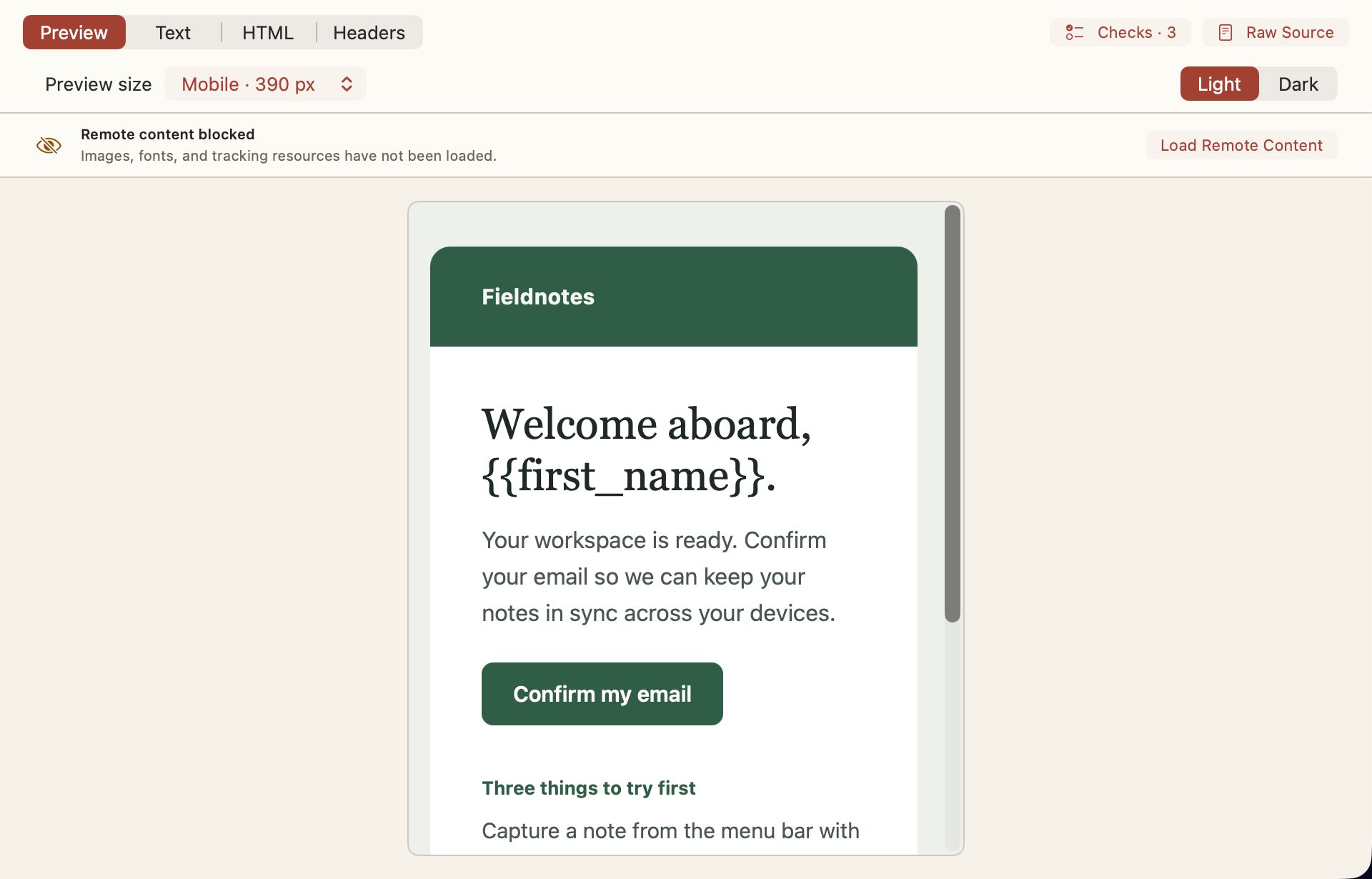
Every width, light and dark
Each size changes the real WebKit viewport, so your media queries respond the way they would on a phone.
- Desktop
- Fits the window
- Mobile
- 390 px
- Tablet
- 768 px
- Light or dark
- Remembered between launches
These are viewport previews, not simulations of Gmail, Outlook or a phone’s mail app.
Let your coding assistant read the inbox
Turn on MailScope’s MCP server and assistants like Claude Code can wait for the email your code just sent, read it, and run the same local checks.
- Read-only. Assistants can list, wait for and read captured email. They can’t send or delete.
- Only on this Mac. The server listens on
127.0.0.1and needs an access token. - Off until you turn it on. Copy the configuration from Settings when you want it.
Sign up a test user and check the welcome email.
The welcome email still says {{first_name}} in the subject and heading. The signup handler isn’t passing the user’s name to the template. I’ll fix that and send it again.
Safe with real-looking test data
Never relayed
Captured email stays in MailScope. Nothing is forwarded to real recipients.
Remote content blocked
Images, fonts and tracking pixels load only when you choose. Scripts never run in previews.
Links checked on request
No URL is contacted until you select it, and checks send no cookies or credentials.
Risky attachments flagged
Executables and installers are blocked. Files that can run code ask before opening.
Questions
When can I download MailScope?
The Mac preview is coming soon. There’s no public download yet. MailScope needs macOS 14 or later and runs on Apple silicon and Intel Macs.
Does it show how Gmail or Outlook will render my email?
No. Previews use WebKit at real viewport widths. They don’t simulate any particular email client. Use MailScope to catch content and template mistakes early, and a client-testing service when you need exact rendering.
Do the checks guarantee my email will be delivered?
No. Local checks look for common content mistakes. They don’t validate every HTML rule or predict spam filtering or deliverability.
Does it need an account or an internet connection?
No. Capture, preview and local checks work offline without an account. The network is only used when you choose to check links or load remote content.
What if port 1025 is already in use?
MailScope tells you and offers a nearby free port in one click. Change the port in your app to match, or use the copy buttons, which always include the current port.
Which MCP clients work with it?
Any client that supports Streamable HTTP and a custom Authorization header. Choose Copy MCP Configuration in Settings and add it to your assistant. The tools are get_smtp_status, list_emails, wait_for_email, get_email and run_local_checks.